Free Chrome extension
SERP Location Changer for Google
Change your Google search location to any city or country and see the results, and the Maps local pack, exactly as a searcher there would. No VPN, no proxy, no account. Free and open source.
100% free, open-source, and community-driven.
See it in action
Watch how it works
Watch how easy it is to change your search location and analyze international search results in seconds.
What it does
Analyze international SERPs with ease
Search Location Changer changes the location Google uses for your searches without changing your real IP or physical location. Pick a place in the popup, switch the override on, and every Google search you run returns results, including the Maps local pack, for that place. Switch it off and you're back to your own location.
Note: this is not a VPN, but a lightweight, purpose-built search-location-changer designed for accuracy.
Reliable localized SERPs
Changes the Google search location parameters without affecting your real IP or physical location.
Seamless experience
One toggle in a lightweight popup. No proxy, no separate browser, no change to your normal tabs when it's off.
Use cases
Built for professionals
Local SEO specialists
Check GBP rankings and map packs from any city without proxies.
Multi-location businesses
Monitor 10+ local locations across service areas instantly.
Digital agencies
Audit client performance in target markets — restaurants, auto services, home services.
SEO researchers
Analyze geo-specific ranking factors and local search signals.
Digital marketers
See trending topics and research what ranks in different countries.
Curious users
Explore localized search results effortlessly.
Perfect for local SEO: check rankings from any city
- Simulate 'service + city' searches from target locations to see your GBP in map packs.
- Spot ranking issues from inconsistent citations, stale reviews, or weak social signals.
- Monitor multi-location performance across 10+ GBPs without travel or complex setups.
- Ideal for agencies optimizing local businesses in competitive markets.
How it works
Four steps to localized results
Install
Open the Chrome Web Store listing and click Add to Chrome.
Pin it
Click the puzzle icon in Chrome's toolbar and pin Search Location Changer so it's one click away.
Pick a place
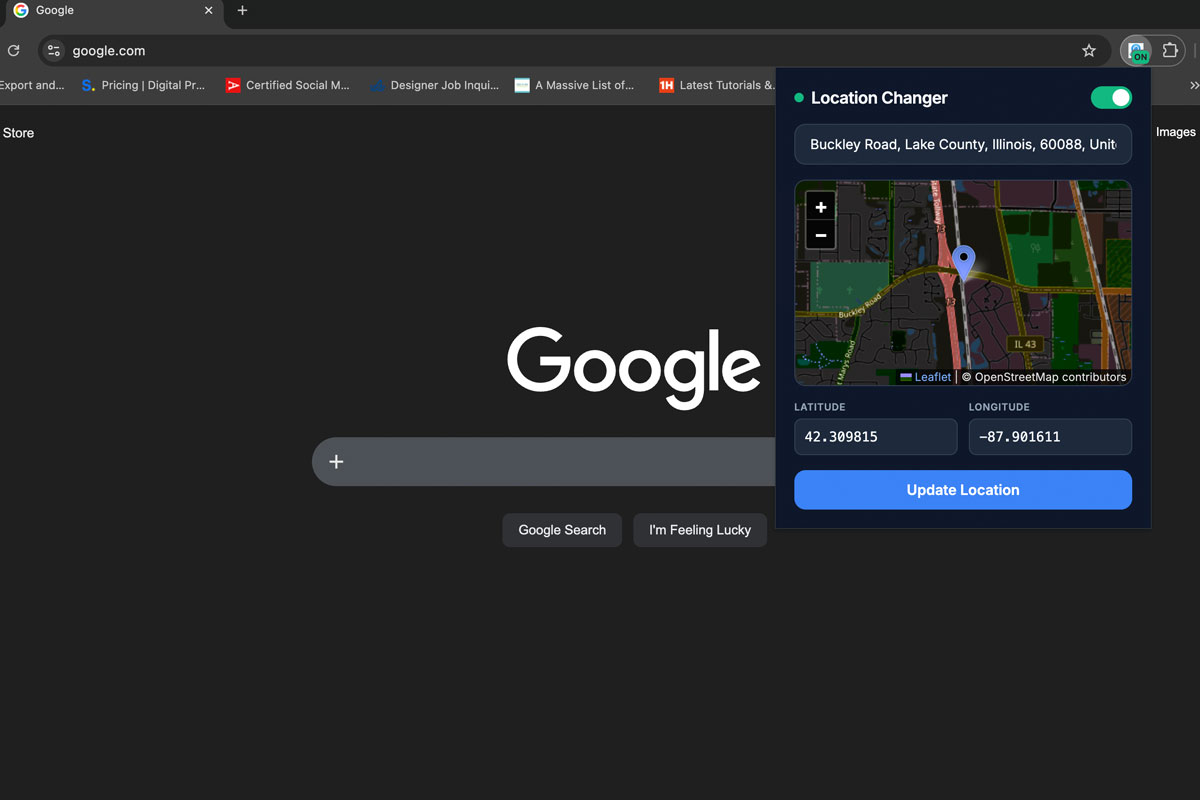
Search any city, street or neighborhood, or click the map, then switch the override on.
Search Google
Run your search. Results and the local pack now reflect the location you picked.
Open-source and privacy
Search Location Changer is 100% open-source. The code is public, auditable, and developers are welcome to fork, review, and contribute.
We do not collect unnecessary personal data. The extension only modifies your Google search location signals for SERPs — and nothing else.
View repository on GitHubSupport and feedback
We actively maintain the project through the open-source community. If you find a bug or have ideas for new features, we'd love to hear from you.
Found a bug? Open an issue on GitHub to let us know.
Report issues on GitHubQuestions
How do I change my Google search location?
Install Search Location Changer, pick a city or drop a pin on the map, switch the override on, then search Google as normal. Google returns results, including the Maps local pack, as if you were searching from that place. Switch it off to go back to your real location.
Can I see Google Maps and local pack results for another city?
Yes. The local pack depends heavily on where the searcher is, which is exactly what the extension changes. For tracking a business across a whole grid of points instead of one location, use our free GBP Rank Tracker desktop app.
Is this the SE Ranking location changer?
No. SE Ranking and other SEO platforms make their own extensions. Search Location Changer is an independent, free and open-source alternative built by VDESIGNU, with no account or subscription.
Does this change my real IP or location?
No. It only safely modifies the search location parameters sent to Google for that specific query. Your real IP and device location stay exactly the same.
Does it work for other search engines?
Currently, it is optimized specifically for Google search results to provide the most accurate region representations.
Is it free?
Yes, it is completely free to use and 100% open-source.
Is it safe to use?
Absolutely. The codebase is transparent and fully auditable on GitHub. We don't track your browsing history or collect personal data.
How does it handle languages in multi-language regions?
You can easily select both the country and the language/region settings within the extension to ensure you get precisely the localized language results you need.
Get started
Start changing your search location
Analyze international search results for free with our open-source tool, built specifically for SEOs, researchers, and content creators.
Beyond one location
Seeing a competitor above you in another city?
One location shows you one result. To see where a business ranks across a whole area, street by street, run a geo-grid scan with our free GBP Rank Tracker. And if the grid is red where your customers are, that's the work our local SEO team does every day: Google Business Profile optimization, reviews, citations and location pages.
Based in the UAE? Local SEO in Dubai covers how the Maps pack works across Dubai's districts.