Free & open-source — desktop app for Windows & macOS
Free Google Maps Rank Tracker & GBP Grid Scanning Tool
The #1 open-source Google Business Profile rank tracker. Track your local rankings across a geo-grid, see exactly where you rank #1 and where you disappear — all from a free desktop app.
- 100% secure — no cloud servers
- Data never leaves your machine
- MIT licensed — free forever
- No API keys needed
GBP Rank Tracker runs 100% locally on your computer. No cloud servers, no third-party data sharing, no tracking. Every scan stays private. The full source code is publicly auditable on GitHub.
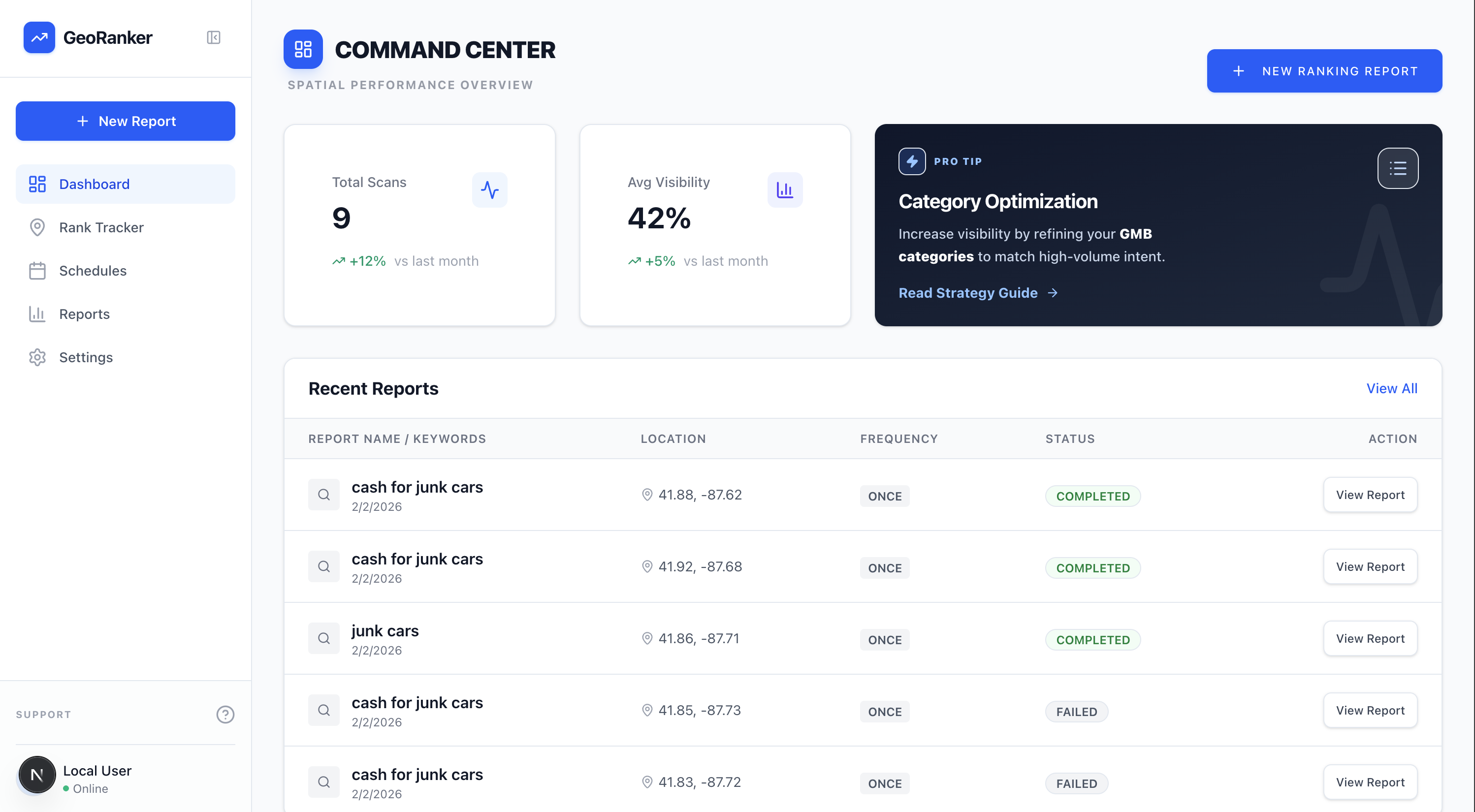
The comparison
The unfair advantage
See why agencies are switching to open-source.
Comparing grid scanning & mapping capabilities only
| Platform | Cost structure | Scan credits | Grid size | Privacy |
|---|---|---|---|---|
| GBP Rank Tracker You | $0.00 / mo | Unlimited | 13x13+ | Local (your data) |
| Local Falcon | Monthly / pay-per-scan | $0.05 / scan | Limited | Shared |
| BrightLocal | Monthly / pay-per-scan | Monthly Limit | Limited | Shared |
| Whitespark | Monthly / pay-per-scan | Package Based | Limited | Shared |
| Places Scout | Monthly / pay-per-scan | Expensive | Limited | Shared |
| GMB Everywhere | Monthly / pay-per-scan | limited | Limited | Shared |
| Surfer Local | Monthly / pay-per-scan | Monthly Limit | Limited | Shared |
| Grid My Business | Monthly / pay-per-scan | Monthly Limit | Limited | Shared |
| Nightwatch | Monthly / pay-per-scan | Package Based | Limited | Shared |
| Semrush | Monthly / pay-per-scan | Expensive Add-on | Limited | Shared |
| Moz Local | Monthly / pay-per-scan | Expensive Add-on | Limited | Shared |
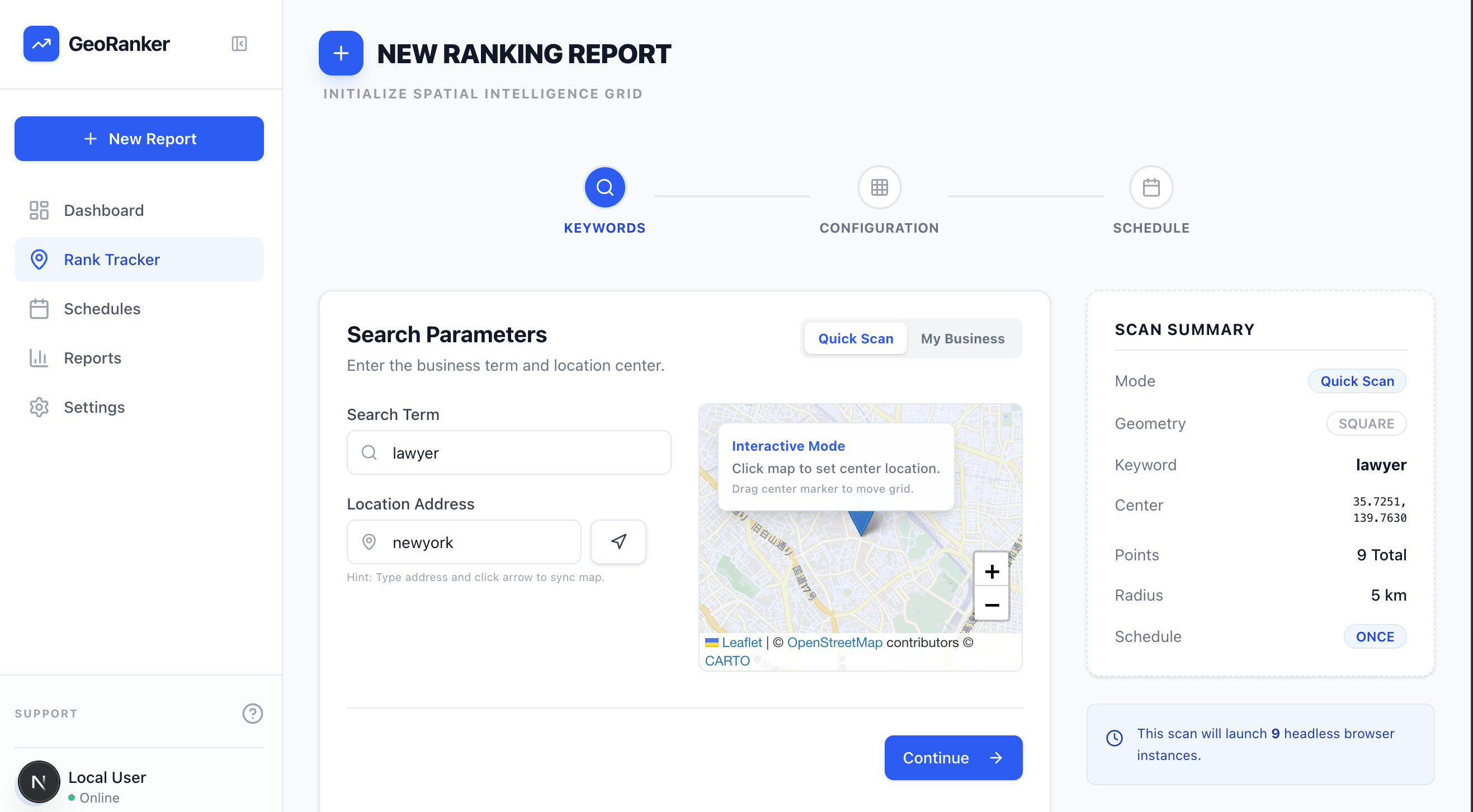 Live scan preview
 The report
Visualize your local visibility
-
Detailed heatmaps
Instantly spot where you rank #1 and where you're invisible. Color-coded grids make it easy to identify weak zones.
-
Competitor benchmarking
See exactly how you stack up against the competition in every specific neighborhood. Their weaknesses are your opportunities.
-
Shareable reports
Generate professional, white-label ready visualizations to prove value to your clients or stakeholders.
The toolkit
Everything you need for local SEO
GBP Rank Tracker isn't just a grid scanner — it's a complete local SEO intelligence suite. Three powerful tools in one free desktop app.
Geo-grid rank tracking
Smart city grids
4 grid modes — square, circle, ZIP code, and smart grid. Sizes from 3x3 (9 points) to 13x13 (169 points). The smart grid uses an offline database of 1.8M+ postal codes across 121 countries to place scan points on real neighborhoods, not empty land.
Real browser scans
Not API guesses — real Playwright/Chromium browser automation. Fully isolated context per grid point with zero cookies, randomized user agents, precise timezone, locale, and GPS coordinate matching. See exactly what a local customer sees.
Color-coded heatmaps
Results mapped on interactive Leaflet/OpenStreetMap with numbered markers (1-20). Green = #1-3, Orange = #4-10, Red = #11-20, Black = not found. MiniMap per row, enlarged map modal, and address resolution overlay.
CID-first matching
Uses Google's internal Customer ID (CID) for bulletproof business identification. Auto-saves CID on first name match. Top-20 SERP capture per grid point with business name normalization handling abbreviations, punctuation, and suffix variations.
Scheduled automated scans
Set daily or weekly scans and let the app run them automatically. Multi-run history with timeline comparisons to track ranking changes over time. Schedule management page for viewing, editing, and canceling scheduled scans.
Enterprise proxy support
Built-in proxy management with automatic failover and dead proxy detection. Bulk import from 4 free proxy sources with auto-testing. Configure rotating residential proxies for heavy agency-level scanning without getting rate-limited.
Google Reviews Analyzer
Deep review scraping
Scrape hundreds or thousands of Google reviews for any business. Deep scroll reliability for businesses with 1,000+ reviews. Source attribution with direct Google Maps URL links for every review.
AI sentiment analysis
Powered by wink-nlp and VADER hybrid NLP. Understand what customers love and hate. 150+ metrics including rating trends, response rates, seasonal patterns, and keyword extraction.
Fake review detection
Automatically flags suspicious review patterns — velocity spikes, low-effort reviews, and anomalous activity. Protect your reputation and expose competitor manipulation. Export full analysis to XLSX, PDF, JSON, CSV.
Intelligence Dashboard
Market share analysis
Competitive concentration measured with the Herfindahl-Hirschman Index (HHI). Share of Voice analysis showing your visibility percentage compared to every competitor across the entire grid.
Competitor threat scoring
Automatic threat scoring based on proximity, frequency, and ranking depth. Geographic distribution analysis showing competitor quadrant dominance. All Listings table with every business discovered across all grid points.
Export & reporting
Export everything to XLSX, PDF, JSON, and CSV. Generate professional client-ready reports with color-coded heatmaps and competitor charts. Save grid presets and business profiles for recurring audits.
Open-source core
Built on modern standards
GBP Rank Tracker is a native desktop app engineered for performance, privacy, and user control. Built with Electron, it runs natively on Windows and macOS with auto-updates. Inspect the code, contribute to the repo, or fork it for your own internal tools.
Playwright & headless Chrome
The engine that powers the scans. Robust, unblockable browser automation that mimics real human behavior. Isolated browser context per grid point — zero cookies, randomized user agent.
SQLite & Prisma
Zero-config database. Your data lives in a single file on your machine. Easy backups, no cloud fees. Database survives app updates.
Electron + Next.js + React
Native desktop app with a snappy, responsive dashboard. Auto-updates via GitHub Releases. Content Security Policy, OS-level sandboxing, and crash reporting built in.
danishfareed/Google-Maps-SERP
Public repository
Stars —
Forks —
Watchers —
Latest release —
Get started
Download & install
Get started in under a minute. Download the free desktop app for Windows or macOS — no setup, no dependencies, no terminal commands required.
Windows
Windows 10/11 (64-bit)
Download the .exe installer. Run it and follow the prompts. If Windows SmartScreen appears, click "More info" then "Run anyway" — the app is open-source and safe.
macOS
macOS 11+ (Apple Silicon & Intel)
Download the .dmg file. Open it and drag the app to Applications. If macOS blocks it, right-click the app, select "Open", then click "Open" again.
Advanced: build from source Requires Node.js 18+
git clone https://github.com/danishfareed/Google-Maps-SERP.gitcd Google-Maps-SERP && npm installnpx playwright install chromiumnpm run dev
The app includes automatic updates — you'll be notified when new versions are available.
View all releases on GitHub
Questions
Frequently asked
Everything you need to know about GBP Rank Tracker — the free Google Maps SERP checker and grid tracker.
What is GBP Rank Tracker?
GBP Rank Tracker is a free, open-source desktop application for Windows and macOS that tracks your Google Business Profile (GBP) rankings across a geographic grid. It runs real Google Maps searches from multiple geographic points using browser automation and maps results into a color-coded ranking heatmap — green for top 3, orange for 4–10, red for 11–20, and black for not found. It helps local SEO professionals, agencies, and business owners understand exactly where they rank and where they're invisible.
How is GBP Rank Tracker different from Local Falcon, BrightLocal, and other grid trackers?
Unlike paid tools such as Local Falcon, BrightLocal, Whitespark, and Places Scout that charge per scan or require monthly subscriptions, GBP Rank Tracker is 100% free with unlimited scans. It runs locally on your computer using real browser automation (Playwright/Chromium), not third-party APIs, so your data never leaves your machine. It supports grids up to 13x13, smart city grids using ZIP codes, competitor analysis, AI-powered review intelligence, and scheduled automated scans — features that cost hundreds of dollars per month with competitors.
Is GBP Rank Tracker really free? What's the catch?
Yes, GBP Rank Tracker is 100% free and open-source under the MIT License. There are no hidden fees, no credit limits, no premium tiers, and no data collection. The app runs entirely on your computer. The source code is publicly available on GitHub for anyone to inspect, fork, or contribute to. We built this to democratize local SEO tools that were previously locked behind expensive subscriptions.
What platforms does GBP Rank Tracker support?
GBP Rank Tracker is available as a native desktop app for Windows (10/11, 64-bit) and macOS (11+, both Apple Silicon M1/M2/M3/M4 and Intel). The app includes automatic updates through GitHub Releases, so you'll always have the latest version. You can also build from source on Linux using Node.js.
How do I download and install GBP Rank Tracker on Windows?
Visit the download section on this page or go to the GitHub releases page. Download the .exe installer file, run it, and follow the prompts. If Windows SmartScreen shows a security warning (because the app is not code-signed with an expensive certificate), click 'More info' and then 'Run anyway'. The app is open-source and safe — you can inspect every line of code on GitHub.
How do I download and install GBP Rank Tracker on Mac?
Download the .dmg file from the download section on this page or from GitHub Releases. Open the DMG file and drag the app to your Applications folder. If macOS shows 'app is damaged' or 'unidentified developer', right-click the app, select 'Open', then click 'Open' in the dialog. This is standard behavior for open-source apps distributed outside the Mac App Store. The app supports both Apple Silicon (M1/M2/M3/M4) and Intel Macs running macOS 11 or later.
Does GBP Rank Tracker update automatically?
Yes. GBP Rank Tracker includes built-in auto-update functionality powered by electron-updater and GitHub Releases. When a new version is available, the app will notify you and can download and install the update automatically. You can also manually check for updates or download the latest version from the GitHub releases page at any time.
What grid sizes does GBP Rank Tracker support?
GBP Rank Tracker supports grid sizes from 3x3 (9 points) up to 13x13 (169 points). It also supports multiple grid modes: square grid, circle grid, ZIP code-based grids, and smart city grids. The smart grid mode uses an offline postal code database covering 1.8 million+ codes across 121 countries to intelligently place scan points on actual neighborhoods rather than empty land.
What is geo-grid rank tracking and how does it work?
Geo-grid rank tracking is a method of checking Google Maps rankings from multiple geographic points in a defined area. GBP Rank Tracker places a grid of virtual 'pins' across a city or region, then runs a real Google Maps search from each pin's exact GPS coordinates using headless browser automation. The results are displayed as a color-coded heatmap showing your ranking position at each point. This reveals your true local visibility — you might rank #1 downtown but be invisible 5 miles away.
Does GBP Rank Tracker require a Google Maps API key?
No. GBP Rank Tracker uses advanced headless browser automation (Playwright with Chromium) to perform real Google Maps searches, exactly as a human user would. It does not use the Google Maps API, Google Places API, or any paid Google service. This means zero API costs and more accurate results that reflect what real users actually see when they search on Google Maps.
Can GBP Rank Tracker analyze Google Reviews?
Yes. GBP Rank Tracker includes a powerful Google Reviews Analyzer that can scrape hundreds or thousands of reviews for any business. It provides AI-powered sentiment analysis, fake review detection (identifying suspicious patterns, velocity spikes, and low-effort reviews), 150+ metrics including rating trends, response rates, seasonal patterns, and keyword extraction. You can export review data in XLSX, PDF, JSON, and CSV formats.
What is the Intelligence Dashboard in GBP Rank Tracker?
The Intelligence Dashboard provides advanced competitive analytics including: Market Share analysis using the Herfindahl-Hirschman Index (HHI), Share of Voice analysis showing your visibility compared to competitors, geographic heatmaps with color-coded grid pins, competitor threat scoring, and rank change alerts. It gives you a comprehensive view of the competitive landscape in your local market.
Does GBP Rank Tracker support scheduled automated scans?
Yes. You can schedule daily or weekly automated scans for any business and keyword combination. The app runs the scans automatically at your specified times and stores the results in your local database. This lets you track ranking changes over time without any manual effort. You can view historical data through the timeline comparison feature.
Can I track competitor rankings with GBP Rank Tracker?
Absolutely. Every scan automatically captures data for all businesses that appear in Google Maps results at each grid point. You can analyze competitor share of voice, see where competitors outrank you, identify their weak zones, and track how your rankings compare over time. The Intelligence Dashboard provides detailed competitor threat scoring and market share analysis.
Do I need proxies to use GBP Rank Tracker?
For light usage (checking a few keywords once or twice a week), you typically don't need proxies. However, for heavy agency-level scanning (hundreds of keywords daily across multiple businesses), we recommend using rotating residential proxies to prevent Google from temporarily rate-limiting your IP. GBP Rank Tracker has built-in proxy support with automatic failover, dead proxy detection, and can bulk import proxies from 4 free sources with auto-testing.
Is my data private when using GBP Rank Tracker?
Yes, 100%. GBP Rank Tracker runs entirely on your local machine. All scan data, business profiles, review analyses, and reports are stored in a local SQLite database file on your computer. No data is ever sent to any external server, cloud service, or third party. You have complete ownership and control over your data. You can back up, move, or delete your data at any time by managing the single database file.
What technology is GBP Rank Tracker built with?
GBP Rank Tracker is built with a modern, enterprise-grade tech stack: Electron for the native desktop app shell, Next.js (App Router) with React for the frontend, Tailwind CSS 4 and Framer Motion for the UI, Leaflet with OpenStreetMap for mapping, Recharts for data visualization, SQLite via Prisma ORM for the local database, Playwright with Chromium for browser automation, wink-nlp and VADER for sentiment analysis, and ExcelJS with jsPDF for report exports.
Who should use GBP Rank Tracker?
GBP Rank Tracker is designed for: Local SEO agencies auditing client rankings and proving ROI, multi-location businesses comparing performance across branches, service area businesses (SABs) understanding visibility in their coverage zones, freelance SEO consultants who need professional tools without expensive subscriptions, and any business owner who wants to understand their Google Maps visibility. Whether you manage 1 location or 1,000, the unlimited scans make it equally cost-effective.
Can I use GBP Rank Tracker for client reporting?
Yes. GBP Rank Tracker generates professional visualizations including color-coded heatmaps, competitor comparison charts, and trend reports. You can export data to XLSX, PDF, JSON, and CSV formats for use in client presentations. The visual grid maps are particularly effective for showing clients exactly where they rank and where improvements are needed. White-label reporting capabilities are being actively developed.
How accurate is GBP Rank Tracker compared to manual Google Maps searches?
GBP Rank Tracker uses real browser automation that simulates actual user devices with precise timezone, locale, and GPS coordinate matching. This means the results are as accurate as manually searching Google Maps from each location yourself. Unlike API-based tools that may return different results than what users actually see, our browser-based approach captures the exact same search results a real customer would get.
What are the best free alternatives to Local Falcon?
GBP Rank Tracker is the best free alternative to Local Falcon. While Local Falcon charges $0.05 per scan point (meaning a single 13x13 grid costs $8.45), GBP Rank Tracker offers unlimited scans at zero cost. It provides comparable or superior features including larger grid sizes, smart city grids, competitor analysis, review intelligence, and scheduled scans — all running locally on your machine with full data privacy.
How does GBP Rank Tracker compare to BrightLocal's Local Search Grid?
BrightLocal's Local Search Grid requires a monthly subscription starting at $39/month with limited scan credits. GBP Rank Tracker is completely free with unlimited scans. Both offer grid-based rank tracking, but GBP Rank Tracker adds AI-powered review analysis, an intelligence dashboard with market share metrics, and complete data privacy since everything runs locally. BrightLocal stores your data on their cloud servers.
Is GBP Rank Tracker better than Grid My Business?
Grid My Business was a popular free tool but has become limited in functionality and reliability. GBP Rank Tracker offers a much more comprehensive feature set including grids up to 13x13 (vs typically 7x7), smart city grids, competitor analysis, review intelligence, scheduled scans, and a full intelligence dashboard. Plus, as a desktop app, it's faster and more reliable than browser-based alternatives.
Why does Windows SmartScreen block the installer?
Windows SmartScreen may show a warning because GBP Rank Tracker is not signed with an expensive code-signing certificate (which costs $200-400/year). This is common for free, open-source software. The app is completely safe — the source code is publicly available on GitHub for anyone to inspect. To proceed: click 'More info' on the SmartScreen dialog, then click 'Run anyway'. This only happens on the first install.
Why does macOS say the app is from an unidentified developer?
Apple requires developers to pay $99/year for a Developer ID certificate to bypass Gatekeeper warnings. Since GBP Rank Tracker is free and open-source, we use ad-hoc code signing instead. To open the app: right-click (or Control-click) on the app in Applications, select 'Open' from the context menu, then click 'Open' in the security dialog. You only need to do this once — subsequent launches will work normally.
Can I run GBP Rank Tracker on Linux?
While we don't currently provide pre-built Linux binaries, you can run GBP Rank Tracker from source on any Linux distribution. Clone the repository from GitHub, install Node.js 18+, run 'npm install' followed by 'npx playwright install chromium', and then 'npm run dev' to launch the development server. The full build instructions are available in the GitHub repository README.
Is GBP Rank Tracker open source? Can I see the code?
Yes, GBP Rank Tracker is fully open-source under the MIT License. The complete source code is available on GitHub at github.com/danishfareed/Google-Maps-SERP. You can inspect every line of code, fork the project for your own use, or contribute improvements. The MIT License means you can use it for any purpose, including commercial use, with no restrictions.
How can I contribute to GBP Rank Tracker?
We welcome contributions from the community! You can contribute by: reporting bugs or suggesting features through GitHub Issues, submitting Pull Requests with code improvements, helping with documentation, sharing the project with other SEO professionals, or starring the repository on GitHub to increase visibility. The project is built with Next.js, React, Electron, and Playwright — contributions of all sizes are appreciated.
Can I export scan data from GBP Rank Tracker?
Yes, GBP Rank Tracker supports multiple export formats. You can export scan data, review analyses, and reports to XLSX (Excel), PDF, JSON, and CSV formats. This makes it easy to import data into other reporting tools, create custom client presentations, or archive historical ranking data. The export functionality uses ExcelJS for spreadsheets and jsPDF for PDF generation.